
Technology Assessment: How to Evaluate Your Business Tech
A technology assessment is a structured review of the tools, systems and workflows your business runs on. It checks what you have, what each piece costs, whether it supports how you make money, and what to keep, fix, merge or drop. Done well, it ends in a short, ranked action plan, not a thick report of maturity scores.
This guide is for owners and managers of small and mid-sized businesses. It walks through what to inventory, how to judge tools and vendors, how to deal with tool overload, and how to turn findings into a plan you can act on.
Raremindraremind.coMake Your Technology Work for RevenueRaremind’s Money Map identifies lost revenue, excessive costs and process inefficiencies, with independent advice that does not push unnecessary technology.Explore Raremind’s approach
TL;DR
Start with how your business earns money, then judge each tool by whether it supports that path. Features come second.
Inventory everything: software, subscriptions, spreadsheets, integrations and manual workarounds, each with an owner and a full cost.
Score tools and vendors on fit, reliability, usability and total cost, and keep a lifecycle view of each vendor from selection to exit.
A useful assessment ends with three to five ranked priorities, cost bands and the consequence of waiting, not generic diagrams.
Review on a set schedule so overload does not creep back.
Table of Contents
What a business technology assessment is for
Start with revenue, not with tools
Step 1: Build a complete inventory
Step 2: Judge each tool on fit, not features
Step 3: Assess your vendors, not just your products
Step 4: Name the cause of overload
Step 5: Turn findings into a plan
Set a review rhythm
Our perspective
Get an independent assessment
Sources
What a business technology assessment is for
The phrase covers two different things. In academia and public policy, “technology assessment” means studying the wider effects of an emerging technology before society adopts it. That is not what most business owners are searching for.
The business version is practical. It answers four questions:
What technology do we actually have, and who uses it?
What does it cost us in total, including time?
Does it help us win, serve and bill customers, or does it just exist?
What should we do next, in what order?
The same exercise appears under other names: technology needs assessment, technology portfolio assessment, technology vendor assessment. The scope differs a little. A needs assessment looks forward at gaps. A portfolio assessment looks at what you already own. A vendor assessment looks at the companies behind the tools. A good review covers all three in proportion to your size.
Start with revenue, not with tools
Most assessments begin with a list of software. We think that is the wrong first move, because a tool list cannot tell you which tools matter.
Begin by tracing how the business makes money: how a lead arrives, how it becomes a quote, how the work is delivered, how the invoice goes out and how cash comes in. At each step, note where people re-key data, wait on someone, chase a status or work around a system. Those points are where revenue leaks and costs hide.
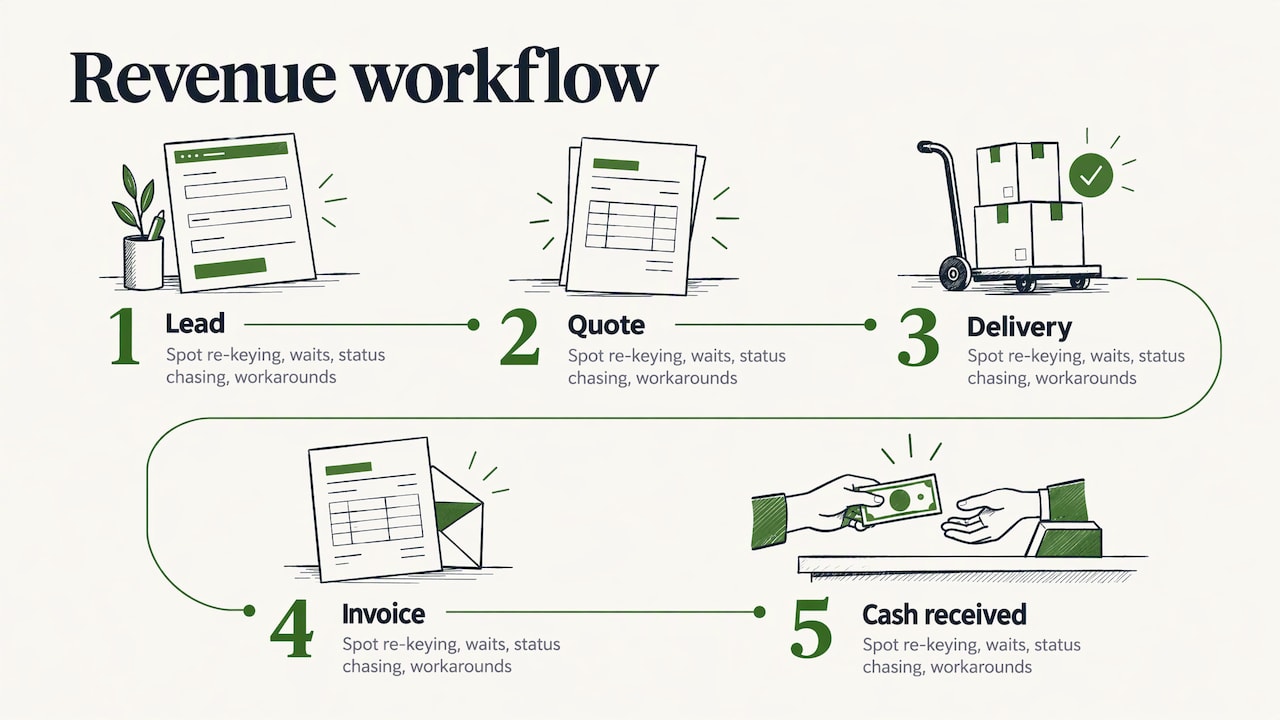
Only then do you lay the tools over the map. A tool sitting on a critical step earns scrutiny and investment. A tool sitting on no step at all is a candidate for removal. This is the logic behind our own Money Map, which we use to show where a business loses revenue, spends too much and runs inefficient processes before any technology question comes up. If you want the same thinking applied to AI specifically, our guide on mapping revenue workflows before buying tools goes deeper.
Step 1: Build a complete inventory
You cannot assess what you cannot see. The U.S. National Institute of Standards and Technology makes this point in its small business cybersecurity guidance: it advises keeping an inventory of hardware, software, systems and services as the first step in understanding what your business relies on. The same list serves a cost and efficiency review.
A spreadsheet is enough. Use one row per tool, with these columns:
Column | What to record |
|---|---|
Tool and purpose | Name and the job it does |
Business owner | The person accountable, not just the admin |
Users | Who has a seat, who actually logs in |
Annual cost | License, add-ons, support, usage fees |
Contract terms | Renewal date, notice period, data export rights |
Connected systems | What it exchanges data with, and how |
Workflow step | Where it sits on your revenue map |
Include the unofficial layer too: spreadsheets that carry real processes, tools bought on a team card, free accounts holding customer data. Our shadow IT audit guide shows how to find those without turning it into a hunt for culprits.
Step 2: Judge each tool on fit, not features
Once the list exists, score every tool against a small set of criteria. Keep it to five or six so the exercise stays finishable.
Fit with the workflow. Does it support the step it sits on, or do people bypass it?
Adoption. What share of paid seats are used weekly?
Overlap. Does another tool already do the same job?
Integration. Does data move automatically, or does someone copy and paste?
Total cost. Not the license alone: implementation, integration, training, support and the staff time spent keeping it running.
Risk. What happens to the business if it fails or the vendor changes terms?
The research firm Ventana Research, in its guidance on technology vendor selection, groups evaluation into five categories: adaptability, capability, manageability, reliability and usability. It also argues that vendors are too often rated on marketing and sales execution or on their vision, when the better test is how the product serves your own onboarding, configuration, operations, usage and maintenance. That is a useful correction for any buyer sitting through a polished demo.
A quick worked example
Imagine a 30-person services firm. The inventory turns up two project trackers, three file-sharing tools and a CRM that sales uses for contacts but not for quotes. Quotes live in spreadsheets, and an assistant retypes won deals into the billing system every Friday.
The assessment does not conclude “buy a better CRM.” It concludes that the leak sits between the quote and the invoice. The fix may be an integration or a small automation on tools the firm already owns, plus cancelling two of the overlapping subscriptions. That is a smaller, cheaper and more profitable answer than a platform migration.
Step 3: Assess your vendors, not just your products
Every tool comes with a company attached, and that company’s pricing, security posture and stability become your problem. Vendor assessment works best as a lifecycle, not a one-time check at purchase.
Planning. Define the business need and the risk if the service fails.
Due diligence and selection. Check financial health, security practices, references and the vendor’s roadmap. A vendor due diligence checklist written for investors is a handy model for the questions to ask any company you are about to depend on.
Contract negotiation. Get renewal pricing, usage-growth pricing, data export and termination terms in writing.
Ongoing monitoring. Review performance against the service levels promised, with more frequent checks for vendors that hold sensitive data or run core processes.
Termination. Know how you will leave: how your data comes out, and how long it takes.
This five-stage structure mirrors how U.S. banking regulators frame third-party risk, and the habit transfers well to smaller companies, scaled down. A business with 25 vendors does not need a committee. It needs a tiered list: critical vendors reviewed twice a year, the rest at renewal.
If you buy cloud services or rely on a managed provider, ask what visibility you get into performance and spending. Good hybrid cloud network monitoring practices are one way providers show their work, and a vendor that cannot explain how it tracks uptime is telling you something.
Step 4: Name the cause of overload
Technology overload rarely comes from one bad purchase. It builds up: a tool for each problem, a new one for each manager, and no one retiring the old ones. Staff end up switching between apps, re-entering data and not trusting any single source of truth.
The cost is real. Freshworks reported in its Global Cost of Complexity research that integrating new technology takes 77% longer than expected and that excessive complexity cuts potential revenue by 7% on average. It is a vendor-published survey of IT teams, so treat the numbers as directional for a small business, but the pattern matches what we see: complexity shows up as delay and lost revenue long before it shows up as a line item.
The assessment finds overload through three signals:
Overlap: several tools doing one job.
Orphans: subscriptions nobody owns or uses.
Manual bridges: people moving data between systems that should talk to each other.
For the cleanup itself, see our guides on finding and cutting SaaS sprawl and on application rationalization. If your problem is a system that is too old rather than too many, legacy system modernization is the relevant read.
Step 5: Turn findings into a plan
An assessment that ends as a slide deck changes nothing. The output should be something a busy owner can approve in one meeting.
TMC Insight, writing for small and mid-sized business buyers, says a focused IT consulting deliverable should identify three to five priorities, the systems affected, estimated cost bands, technical dependencies and the operational consequence of deferring each item. It also advises buyers to reject assessments that yield only maturity scores and generic diagrams. We agree with both points.
A plan in that shape looks like this:
Priority | Systems affected | Cost band | Depends on | If we wait |
|---|---|---|---|---|
Connect quoting to billing | CRM, billing | Low | Data field cleanup | Weekly re-keying and invoice errors continue |
Cancel overlapping file tools | Three storage tools | Savings | Migration of shared folders | Paying for duplicates, scattered files |
Single customer record | CRM, support desk | Medium | Agreed ownership of data | Teams keep working from different facts |
For each priority, set an owner, a start date and a measure of success, such as hours saved per week, errors per month or dollars cut from annual spend. Sequence the work so quick, low-cost wins come first and fund the harder changes. Where several systems need to share data, our data integration strategy guide covers how to plan it.
Set a review rhythm
Tool sprawl returns unless someone owns it. A light routine is enough:
Quarterly: check new subscriptions and seat counts against the inventory.
Before every renewal: ask whether the tool still sits on a live workflow step.
Before every purchase: require a named owner, a defined workflow and a cost that includes staff time.
Annually: repeat the revenue map and re-rank priorities.
Our perspective
We built Raremind around one observation: most technology advice starts with technology. A consultant who sells software, or earns a commission when you sign with a vendor, will find a software answer to nearly every problem.
We start somewhere else. We look at how your business makes money, where the process leaks, and where cost piles up. The Money Map puts that on one page. Only after that do we ask whether the answer is a process change, a tool you already own, a consolidation or a new system.
Because we sell no software and take no vendor commissions, our advice is not tied to any product. We use a standard method for every client, and the recommendations are specific to each business. For most owners, the best assessment is not a one-off project. It is an ongoing habit of looking at the business this way, with someone independent beside you as tools, vendors and AI options keep changing.
Mirko
Get an independent assessment
If you would rather not run this alone, that is what Your Digital & AI Office is for. It is our monthly advisory plan at 995 € per month: we map how your business earns money, find lost revenue and excess cost, assess your tools and vendors, and advise on automation and AI, with no software to sell you. Larger, hands-on initiatives are scoped separately as projects.

See how it works at Raremind.
FAQ
How long does a technology assessment take?
For a small or mid-sized business, the inventory and workflow mapping can often be done in a few weeks, depending on how many tools and teams are involved. The time goes mostly into gathering contract and usage data and talking to the people who use the systems. Treat the first pass as a baseline and refine it at each review.
What is the difference between a technology needs assessment and a technology audit?
A needs assessment looks forward: which capabilities the business lacks to reach its goals. An audit looks backward and sideways: what exists, what it costs, whether it is secure and compliant. A practical business review combines both, so you fix what you have before adding something new.
Who should run the assessment?
An owner or senior manager should lead it, because the key questions are about revenue and priorities, not IT settings. Staff who use the tools daily supply the facts. An independent advisor helps when you want an outside view with no product to sell.
How do I assess a technology vendor?
Check fit with your workflow, reliability, usability and total cost, then get renewal, data export and termination terms in writing. After purchase, monitor service levels on a schedule that matches how critical the vendor is, and plan your exit before you need it.
How often should we repeat the assessment?
Run a light check quarterly and a full review once a year. Add one before any major purchase, merger or change in how you sell, since each changes which tools matter.
Sources
NIST Cybersecurity Framework 2.0: Small Business Quick-Start Guide
Ventana Research: Guide Successful Technology Vendor Selections