Shadow IT Audit: A Practical Guide for Growing Businesses
How to run a shadow IT audit without a big security team: find unapproved tools, rank the risk, assign owners, and set a policy people follow.

Shadow IT Audit: A Practical Guide for Growing Businesses
A shadow IT audit is a structured search for every app, cloud service and device your team uses for work that nobody formally approved or tracks. You build a trusted list of what is sanctioned, compare it with what is actually in use, rank the gaps by risk, and give each one an owner and a decision: approve, replace or retire. The audit only works if it ends in decisions. A spreadsheet of discoveries that nobody acts on is just a more detailed worry.
This guide is written for owners and managers of small and mid-sized businesses, often without a dedicated security team. It covers what to look for, where the evidence hides, how to judge what you find, and what a workable policy looks like.
RaremindFind the inefficiencies behind tool sprawlRaremind’s Money Map helps businesses identify process inefficiencies and lost revenue opportunities, with independent advice that does not push unnecessary technology.Explore Raremind’s approach
TL;DR
Start with a list of sanctioned tools, then compare it against payment records, login data, network activity and employee reports.
Single sign-on logs alone miss the riskiest tools, because those are often opened with personal accounts.
Treat each finding as a signal that a workflow is not being served, not as misconduct. Punitive audits push usage further underground.
Rank findings by the data they touch, then assign one named owner per decision.
Repeat the audit on a schedule. A one-time snapshot goes stale within months.
Table of Contents
What counts as shadow IT
Why it happens, and why that changes how you audit
Why it matters: the risks worth naming
How to run a shadow IT audit in seven steps
Shadow AI: the newest blind spot
From audit to shadow IT policy
Keep it continuous
Our perspective
When to bring in an outside view
Sources
What counts as shadow IT
The U.S. banking regulators’ examination handbook defines it as IT devices, software or services operating in an organization without the knowledge, approval or control of IT management. That covers more than people expect:
Cloud services such as file sharing, project boards, design tools and AI chat assistants signed up for with a work email or a personal one.
Off-the-shelf software installed on a laptop, including browser extensions.
Hardware: personal phones, spare servers, USB drives, smart devices plugged into the office network.
Tools inside a vendor’s environment that you never reviewed, which the same handbook notes can also occur in third-party services.
In a small company the usual examples are mundane. A sales rep keeps leads in a personal spreadsheet service. Finance pays for a reporting tool on a credit card. An operations manager pastes customer records into a free AI assistant to draft emails faster. None of them is acting in bad faith.
Why it happens, and why that changes how you audit
The UK’s National Cyber Security Centre makes the point that people turn to unofficial tools when official ones do not meet their needs, and recommends understanding that gap rather than just blocking the result. ISACA says something similar: most employees using shadow IT have no wish to harm the enterprise.
This shapes the whole audit. If employees expect to be disciplined, they hide tools and your inventory becomes fiction. If they expect a fast answer and a better alternative, they tell you what they use. Announce the audit as a cleanup of friction, say plainly that nobody is in trouble for disclosing a tool, and mean it.
Why it matters: the risks worth naming
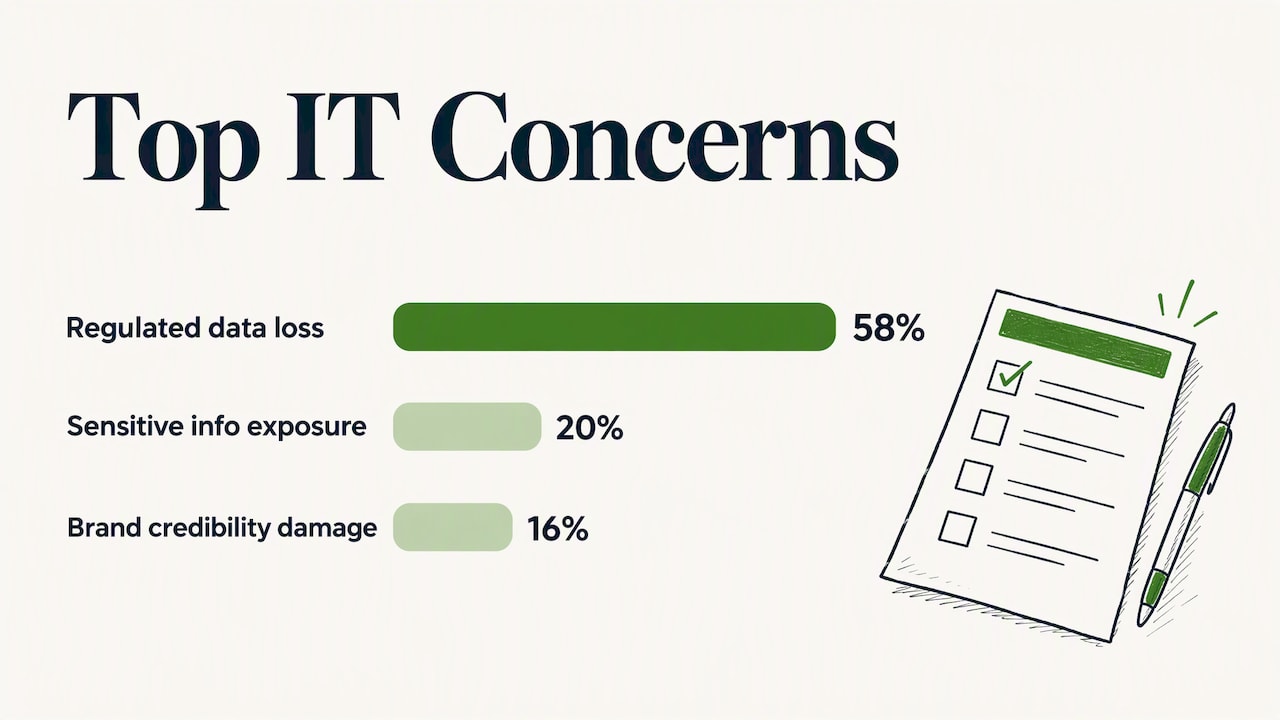
In a 2017 poll of IT professionals, ISACA found that the top concern was loss of regulated personal or financial data (58%), then exposure of commercially sensitive information (20%) and damage to brand credibility (16%). The poll is dated, but the mechanics have not changed. Tools nobody knows about cannot be patched, backed up, monitored or removed when an employee leaves.
For a business your size, the practical risks are:
Data in the wrong place. Customer or financial data sits in an account you do not control, and you cannot get it back when someone quits.
Compliance exposure. If you handle payment, health or financial data, an unreviewed tool can break contractual or regulatory commitments without anyone noticing.
Unlicensed or duplicate software. Several teams may pay for overlapping tools, or use software outside its license terms.
Unknown entry points. Every unmanaged account is a login that nobody is watching.
There is also a cost side that security-only guides skip. Duplicate subscriptions and abandoned trials that turned into paid plans are real money, which is why we treat this as an operations question as much as a security one.
How to run a shadow IT audit in seven steps
1. Set the goal and the boundary
Decide what you want from this round. Common goals are a first inventory, a data-risk review before a customer security questionnaire, or a spending cleanup. Then set the scope: all departments or a pilot, SaaS only or hardware too, employees only or contractors as well. Industry guidance on audit checklists stresses defining objectives before running any discovery tools.
2. Build the list of sanctioned assets
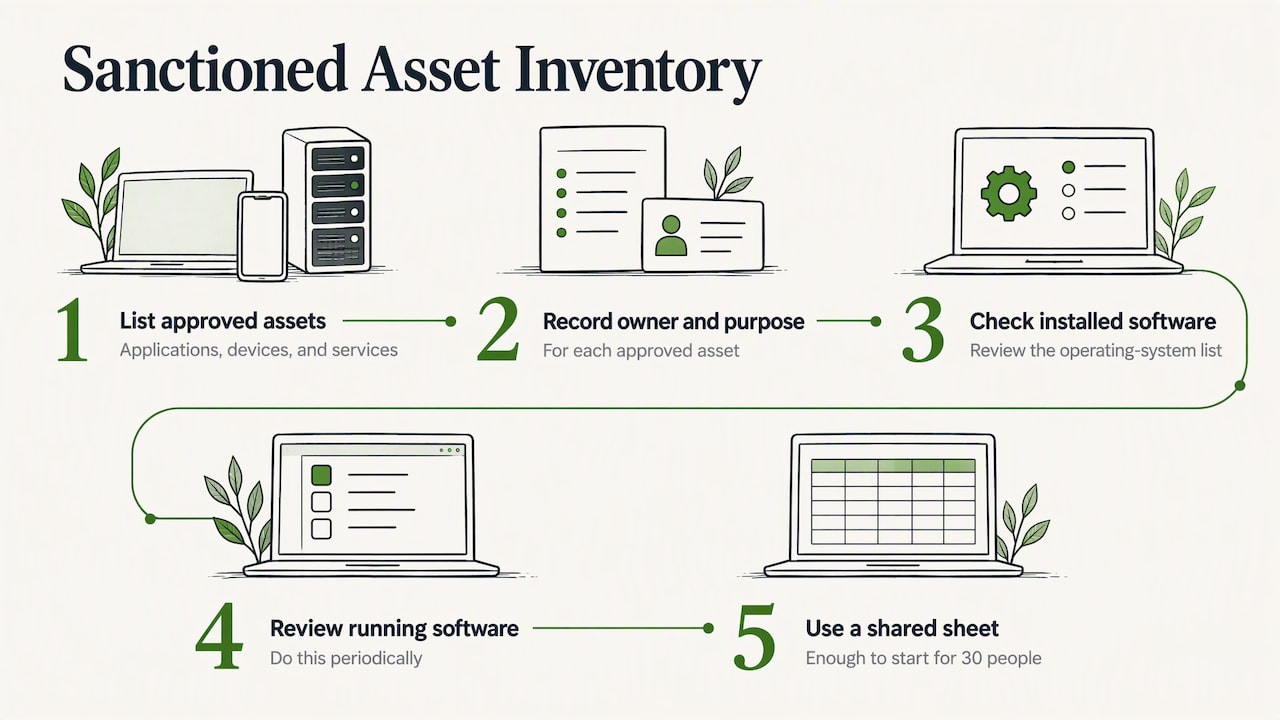
You cannot find what is unauthorized until you know what is authorized. Write down every approved application, device and service, with an owner and a purpose for each. The Center for Internet Security’s guide for smaller organizations suggests simple methods: check the operating system’s installed-software list and periodically review what is running. You do not need a special platform for a 30-person company. A shared sheet with an accountable owner is enough to start.
A phased approach to connecting systems also helps here. When you later decide to fold a discovered tool into your core stack, a phased integration roadmap shows how to sequence that work so the new connection does not become the next unmanaged dependency.
3. Collect evidence from several sources
No single source tells the truth. Use at least four:
Source | What it reveals | What it misses |
|---|---|---|
Expense reports and company card statements | Paid tools, renewals, trials that converted | Free tools, personal cards |
Single sign-on and identity logs | Apps connected to work accounts | Tools used with personal accounts |
DNS and network traffic | Services reached from the office or VPN | Home networks, mobile data |
Endpoint and browser data | Installed software and extensions | Unmanaged personal devices |
A short staff survey | Why people use a tool | Anything people choose not to share |
The Adaptive Security checklist lists SSO logs, expense reports, DNS activity and endpoint data as key discovery signals and warns that relying on SSO alone frequently misses the most dangerous tools, those reached through personal Google or file-sharing accounts. That is why the survey and the finance records matter even if you own good technical tooling.
4. Validate with the business owner
A detected domain is not a finding yet. Ask the team that appears to use it: what is it for, who else uses it, what data goes in? Often the answer reveals a broken process: a approval that takes three weeks, a report the approved system cannot produce, a missing integration. Write that down. It is the most valuable output of the audit.
5. Rank by data and dependency
Not every tool deserves the same attention. ENISA’s governance guidance argues for a pragmatic, risk-based approach that prioritizes the most critical services rather than treating all cloud services as equal. For a small business, a simple three-question score works:
Does it hold customer, employee or financial data?
Would the business stall if it disappeared tomorrow?
Is it tied to a contract, a regulation or a customer commitment?
Two or three yeses go to the top of the list. A personal timer app does not.
6. Decide: approve, replace, or retire
Every finding gets one of three outcomes:
Approve: the tool is fine. Add it to the sanctioned list, set a license and an owner.
Replace: the need is real but the tool is risky or duplicates something you already pay for. Move users to an approved option, with a date.
Retire: the tool serves no ongoing purpose. Export the data, cancel the plan, close the account.
The NCSC advises offering a clear, fast route for requesting and approving the technology people need instead of simply blocking applications.
7. Assign owners and a review date
This is the step that most audits skip. The FFIEC handbook treats shadow IT as an asset-management issue and the research behind this guide points to the same failure: when IT, finance, legal and operations each assume another group is handling the response, findings stay unresolved. Name one person with authority to approve, replace or retire, and put the next review on the calendar.
Shadow AI: the newest blind spot
Generative AI tools are now the fastest-growing category in most audits. They are easy to try, free at the entry level, and people paste real work into them. Add a direct question to your survey: which AI tools do you use for work, and what do you put in them? Then decide which tools are acceptable for which data. Customer lists and contracts need a stricter rule than a draft blog post.
If you are weighing where AI actually helps your operations before approving anything, our AI readiness assessment walks through mapping revenue workflows first, and our piece on when to use AI for business strategy covers the other side: when not to.
From audit to shadow IT policy
The audit tells you what exists. A policy keeps it from drifting again. TechTarget’s guide describes a shadow IT policy as guidelines that prohibit or limit shadow IT by laying out which applications, devices and technologies are acceptable. For a small business, a one-page policy is more likely to be read than ten pages. Cover:
What is approved, and where the list lives.
How to ask for a new tool, with a promised response time. If the answer takes a month, the policy fails.
Which data may never leave approved systems, such as customer payment details.
Who decides, by name or role.
What happens when someone finds an unapproved tool: disclose it, no blame, and a review within a set number of days.
The last point is the hinge. The NCSC’s guidance on non-punitive governance is the reason: a culture where disclosure is safe is the cheapest discovery tool you will ever own.
Keep it continuous
Cloud environments change constantly. ENISA’s guidance on governance includes monitoring, audits, tests and exercises as ongoing activities, not one-off events. A realistic rhythm for a small business:
Monthly: finance reviews card and expense lines for new software charges.
Quarterly: owners confirm their tools are still used and still needed.
Twice a year at minimum: refresh the asset inventory. The research behind this guide cites CIS Control 1 as suggesting at least bi-annual updates, with weekly attention to unauthorized assets in active environments.
At every exit: when someone leaves, review the tools they owned.
Our perspective
Most shadow IT audits we see are framed as a security exercise. We think that is half the picture. Every unapproved tool is evidence that someone found a gap in how work gets done, and gaps in how work gets done tend to cost money: duplicated subscriptions, manual re-entry, leads that wait in someone’s inbox.
So we start where we start with every client: with how the business makes money. We map the path from first contact to cash, then look at which tools sit on that path, which ones people built around it, and which ones nobody uses. That is what our Money Map does. The tool list becomes a by-product of understanding the workflow, and decisions about approving, replacing or retiring come out of that map rather than out of a fear of software.
We do not sell software and we take no vendor commissions, so when the answer is “use what you already have” or “cancel that,” we can say it. Plenty of audits end with fewer tools, not more.
— Mirko
When to bring in an outside view
You can run the steps above yourself. Outside help earns its place when ownership is unclear, when you suspect tools overlap but nobody can prove it, or when you want advice from someone with no product to push. If that is where you are, Your Digital & AI Office is our monthly advisory retainer at €995 per month: we review your operations, find revenue leaks and cost overlaps, assess tool and vendor consolidation, and keep supporting the decisions. Larger hands-on initiatives are scoped separately as projects. For the cost side of the same cleanup, see our guide to cost reduction strategies for small businesses.
FAQ
What is a shadow IT audit?
It is a review that finds the apps, services and devices your people use for work without official approval or tracking. You compare that against your approved inventory, rank the gaps by risk, and decide what to approve, replace or retire. ISACA developed a shadow IT audit and assurance program for larger organizations that follows the same logic.
How do I find shadow IT in a small company?
Combine sources: expense and card statements, identity logs, DNS or network data, device software lists and a short anonymous survey. Any one alone leaves blind spots, especially tools opened with personal accounts. Start with finance records and the survey if you have no technical monitoring.
Do I need a shadow IT policy?
Yes, once you have more than a handful of people using cloud tools. Keep it short: what is approved, how to request something new, which data stays in approved systems and who decides. A policy without a fast request process tends to be ignored.
Is shadow IT always a security problem?
No. It is usually a sign that approved tools or processes are not meeting a real need, and sometimes the unofficial tool is the better one. The risk lies in what data it holds and whether anyone is managing it, which is why the audit ranks findings by data and dependency before deciding anything.