
Customer Onboarding Process: Steps, Metrics, Automation
A customer onboarding process is the set of steps that takes a new customer from signed deal (or sign-up) to their first real result with you. A good one is short, has one owner, asks for as little as possible, and automates only what a person doesn’t need to touch. This guide lays out the steps, the numbers to measure, and how to decide what to automate.
RaremindMake Onboarding Work BetterRaremind can help identify onboarding inefficiencies by mapping how your business generates revenue, then recommend operational improvements without pushing unnecessary technology.Explore Raremind
TL;DR
Onboarding ends when the customer gets a first meaningful outcome, not when the welcome email is sent.
Design for the first win: one small, credible result the customer can reach in a single session.
Match effort to account value: high-touch for large accounts, automated low-touch for small ones.
Map the process before you automate it. Automating a broken flow just makes the break faster.
Collect only the data you need. Privacy rules, and customer patience, both reward it.
Table of Contents
What the customer onboarding process actually is
The stages of a customer onboarding process
Define “onboarded” before you measure anything
Benchmarks worth knowing (and their limits)
High-touch or low-touch: choose by account value
Onboarding automation: what to automate and what not to
Collect less data, and say why
Common mistakes that make onboarding slow
Our perspective: map the money before you pick the tool
Getting help with your onboarding process
A 30-day plan to improve your onboarding
Sources
What the customer onboarding process actually is
Most guides define onboarding as the stage right after purchase. That is true but incomplete. For a business owner, onboarding is the moment where the revenue you won in sales either turns into a lasting customer or starts to leak.
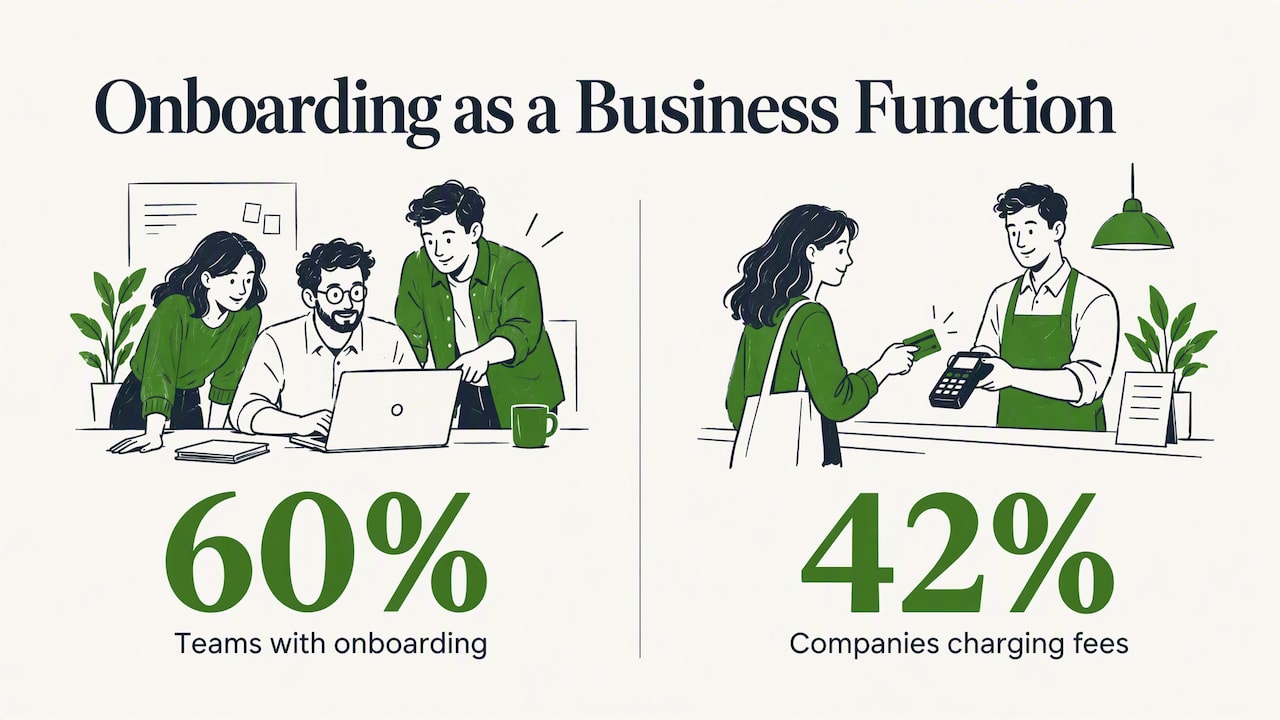
The HubSpot State of Customer Onboarding 2024 report describes the first weeks as the phase where a customer can make or break the decision to renew. The same report finds that 60% of B2B teams now have a dedicated, well-defined onboarding function, and that 42% of companies charge fees for onboarding and implementation. In other words, onboarding is no longer a side task for whoever has time. It is treated as its own piece of the business.
That applies whether you sell software, a managed service, bookkeeping, logistics or consulting. The product differs. The job is the same: reduce the distance between “we signed” and “this is working.”
The stages of a customer onboarding process
Top-ranking guides list anywhere from three to eleven steps. They are mostly the same steps grouped differently. Here is a version that works for most small and mid-sized businesses.
Stage 1: Handoff and preparation
Before the customer hears from you, the person onboarding them should already know what was promised, who the stakeholders are, and what success looks like to the buyer. Broken handoffs between sales and delivery are the most common source of early frustration: the customer repeats everything they told sales, and starts doubting you.
A short handoff record is enough:
Why they bought, in their own words
The outcome they expect and by when
Who signs, who administers, who will actually use it
Anything promised during the sale that is not in the contract
Stage 2: Welcome and kickoff
Send a welcome message within the same business day. Say who the customer’s contact is, what happens in the first week, and what you need from them. Then hold a kickoff call or, for low-touch accounts, a short video and a checklist.
Keep the ask small. A kickoff that opens with a 30-field intake form tells the customer the next six months will be paperwork.
Stage 3: Setup and data collection
This is where accounts, access, integrations and information come in. Two rules help here:
Ask only for what you need for the first win. Everything else can be requested later, when it has a purpose.
Make every request specific: who sends it, in what format, by which date.
The HubSpot report also found that 62% of onboarding managers struggle to hold customers accountable for their assigned tasks. Clear owners and dates, written down, are the cheapest fix.
Stage 4: The first win
The first win is the point of the whole process. One analysis of SaaS onboarding teardowns argues that early wins should be small, credible and achievable in one session, and that companies often fail by demanding a big outcome, such as a full system migration, too early. Instead, aim for one task or one answered question that proves the product is useful.
Examples in non-software businesses:
A bookkeeping firm: the customer’s first clean monthly report
A logistics provider: the first shipment delivered and tracked end to end
An agency: the first approved deliverable
A consulting engagement: one documented leak found and a fix scheduled
Stage 5: Training and adoption
Once the first win lands, widen the circle: more users, more features, more of the workflow. This is where the high-touch versus low-touch decision matters most (more on that below).
Stage 6: Review and handover to ongoing success
Close onboarding on purpose. Hold a review call at a set point, say day 30 or day 60, confirm the original outcome was reached, agree on the next goal, and hand the customer to whoever owns the long-term relationship. If you skip this step, onboarding never formally ends, and nobody checks whether it worked.
Define “onboarded” before you measure anything
The most common metric mistake is counting activity: logins, clicks, emails opened. Research on SaaS activation recommends defining activation as the first meaningful customer outcome, such as a completed report or a live integration. It also describes comparing two groups, customers who reached that milestone and customers who didn’t, and interviewing both to find the exact point where the journey diverges. That tells you far more than a general funnel chart.
You can do a lightweight version with ten customers and a spreadsheet:
Write down the milestone that means “this customer got value.”
List the last ten customers who reached it and the last ten who did not.
Note the date of each step for both groups.
Find the step where the two groups separate. Fix that one first.
Benchmarks worth knowing (and their limits)
Benchmarks come from software companies, so treat them as a rough guide for other industries. The Userpilot SaaS product metrics benchmark reports these averages:
Metric | Reported average |
|---|---|
Activation rate (547 SaaS companies) | 37.5% |
Time to value | 1 day 12 hours |
Onboarding checklist completion | 19.2% (median 10.1%) |
Core feature adoption | 24.5% |
Month 1 retention | 46.9% |
The same source notes that top performers deliver value in under five minutes, and that products taking longer than 15 minutes lose about 75% of users before they see value. Two lessons carry over to any business. Speed to first value matters more than completeness of the walkthrough, and long checklists are mostly ignored.
High-touch or low-touch: choose by account value
A frequent source of waste is giving every customer the same experience. B2B customer success research identifies forcing a high-touch process on low-value segments, or the reverse, as a primary driver of inefficiency and churn.
A simple way to split:
Segment | Approach | What it looks like |
|---|---|---|
Large or complex accounts | High-touch | Named onboarding lead, kickoff call, custom plan, scheduled check-ins |
Mid-size accounts | Hybrid | Group kickoff or short call, templates, a person on standby |
Small or simple accounts | Low-touch | Automated sequence, video walkthroughs, one human checkpoint |
Do the arithmetic before you decide. If a customer pays you a few hundred dollars a year, a two-hour kickoff call can wipe out the first year’s margin. If a customer pays six figures, a purely automated flow is a risk you don’t need to take.
Onboarding automation: what to automate and what not to
Automation is where most owners want to start. It is also where most of the money is wasted, because the process underneath is not yet clear.
Good candidates for automation
Welcome and confirmation messages triggered by signature or payment
Data and document collection, with reminders for what is missing
Account provisioning and task creation, so nobody retypes information from the contract
Scheduling, so the kickoff gets booked without back-and-forth
Progress nudges when a customer stalls on a step
Keep human
The kickoff conversation on any account that matters
Anything involving a customer’s frustration or a surprise
The day-30 review, where you learn what is actually happening
Think in loops, not a line
Onboarding is rarely one person’s journey. B2B products are used by administrators, end users and buyers, each needing something different. One analysis of 100 SaaS onboarding flows warns against a static, linear, single-person flow and promotes continuous “everboarding”: feature announcements, advanced training and re-engagement long after the first session. That source reports support tickets falling by 45% with this approach. It is the vendor’s own analysis, so treat the figure as indicative, not guaranteed. The principle is sound either way: build triggers for each role, not just the buyer.
Collect less data, and say why
Onboarding is where you collect the most personal and commercial information in the whole relationship, and where privacy mistakes happen. Rules differ by country. In the US there is no single federal privacy law covering all businesses, but state laws and industry rules apply, and if you serve customers in the UK or EU, their regimes apply to those customers.
The UK’s official business guidance, business.gov.uk, tells businesses to have a clear lawful basis for processing personal data. Under UK GDPR, data minimisation means collecting only what is needed for the stated purpose. The UK regulator’s sandbox report on a financial services firm shows the practical side: it recommended documenting purposes and building detailed personal data maps. Its technical requirements document points to giving people full privacy information and asking them to positively opt in.
If you handle regulated onboarding such as identity checks for financial services, confirm the specific requirements with your compliance officer or a qualified attorney in the jurisdictions you serve. What you can do as an operator is simple: for every field on your intake form, write down why you need it and when you will use it. If you can’t, delete the field. Customers finish shorter forms, and you hold less data to protect.
Common mistakes that make onboarding slow
Asking for too much, too early. Big outcomes in week one create overload and delay.
No owner. If three people are “involved,” nobody is accountable.
Measuring activity instead of outcomes. Clicks are not value.
One flow for every customer. See the segmentation above.
Automating before mapping. Duplicate tools, repeated data entry and unclear handoffs get baked into the automation.
Ending onboarding by default. Without a review, nobody confirms it worked.
Our perspective: map the money before you pick the tool
We see the same pattern with small and mid-sized businesses. An owner notices that new customers take too long to get going, and the first instinct is to buy an onboarding platform. Months later there is a new subscription, a half-configured workflow, and the same delay.

Our approach starts somewhere else. We look at how the business makes money and where it leaks. For onboarding, that means tracing the path from signed deal to first invoice paid and first result delivered, with our Money Map. We ask who touches the customer, where information gets retyped, which steps wait on a person, and which tools overlap. Often the biggest gain is removing a step, merging two tools or fixing a handoff, with no new software at all. Where automation does pay off, we say so, and we help you choose it based on your process rather than on anyone’s sales pitch.
We don’t sell software and we don’t take vendor commissions, so there is no tool we need you to buy. If your onboarding is fine with a shared checklist and a calendar link, we will tell you that. For more on this thinking, see our AI readiness assessment guide and our piece on cost reduction with operations first.
— Mirko
Getting help with your onboarding process
If you want an outside view of where onboarding costs you money, our Your Digital & AI Office plan is a monthly advisory retainer at €995 per month. It covers mapping your workflows, finding revenue leaks and excess cost, advising on automation, and reviewing which tools you actually need. Larger, hands-on initiatives are scoped separately as projects. If you are unsure whether you need a retainer or a one-off review, our comparison of strategic advisory and traditional consulting explains the difference.
A 30-day plan to improve your onboarding
Week 1: Map. Write the real steps from signature to first result, including who does each and how long it waits. Use what happened with your last five customers, not what the process document says.
Week 2: Define. Pick the first-win milestone and the target date. Remove every intake question not needed to reach it.
Week 3: Fix and segment. Repair the worst handoff. Decide which accounts get high-touch, hybrid and low-touch treatment.
Week 4: Automate one thing. Choose the step with the most repeated manual work, usually welcome, data collection or scheduling, and automate only that. Measure time to first win before and after.
FAQ
What are the three stages of customer onboarding?
The simplest split is preparation (handoff, welcome, kickoff), setup (access, data, training) and first value (the first meaningful outcome plus a review). Longer guides break these into more steps, but the order is the same.
How long should customer onboarding take?
It depends on complexity, so set the target by the first win rather than a calendar. For simple products, minutes or a day is realistic. For services with setup, aim for the first result within the first few weeks and a review at day 30 or 60.
What is required during customer onboarding?
At minimum: a named contact, clear expectations, the access and information needed to start, and a defined first result. If you collect personal data or run identity checks, you also need a lawful basis, a privacy notice at the point of collection and only the fields you need.
How do I streamline onboarding without losing the personal touch?
Automate repeated administrative steps, such as reminders, scheduling and data collection, and keep people in the conversations that build trust. Segment customers so high-value accounts get more human time and small accounts get a clean, self-serve path.
Sources
Why Customer Onboarding Is Killing LTV: Three SaaS Onboarding Teardowns
B2B customer success research on high-touch and low-touch onboarding