
How to Automate Your Sales Process Without Automating the Mess
To automate a sales process, first map how a lead really becomes paid revenue, then automate the repeatable steps in the order money flows: lead capture, follow-up, quoting, invoicing and payment reminders. Software comes last. Businesses that start with a tool tend to automate their existing confusion faster. Businesses that start with the map end up with fewer tools, fewer dropped leads and a shorter path from first contact to cash.
This guide is written for owners and managers of small and midsize businesses who want a working, automated sales process without turning into a software company.
Raremindraremind.coFix the Process Before AutomatingRaremind maps how your business generates revenue to find process gaps and inefficiencies before recommending tools or automation.Explore Raremind’s approach
TL;DR
An automated sales process uses rules and triggers to do routine sales work. Your CRM stores the data, and automation acts on it.
Map the path from first contact to payment before you automate anything. Automating a broken process only makes it break faster.
Start with the steps closest to money: lead capture, follow-up, quotes, invoices and payment reminders.
Cap outreach with exit rules, and track response time, follow-up completion and conversion so you can tell whether it works.
Keep advice about tools separate from the people selling them. Tool choice should follow the process, not lead it.
Table of Contents
What an automated sales process actually is
Map the process before you automate it
Which sales tasks to automate
The order to automate in
Step by step: how to automate your sales process
Guardrails: benefits, risks and exit rules
Our perspective
How to measure whether it works
When to bring in outside help
Work with us
Sources
What an automated sales process actually is
Sales automation means using technology to perform tasks that people used to do by hand. One major CRM vendor describes it as technology that handles often tedious human tasks, cutting manual time, effort and error. That covers two kinds of work: capturing and updating customer data automatically, and triggering actions such as routing a lead or sending a quote for approval.
In practice, an automated sales process is a set of “if this, then that” rules laid over the stages you already use. A form is submitted, so the lead is scored and assigned to a salesperson. A quote goes unanswered for three days, so a reminder is sent. A deal is marked won, so an invoice is created.

Sales automation versus a CRM
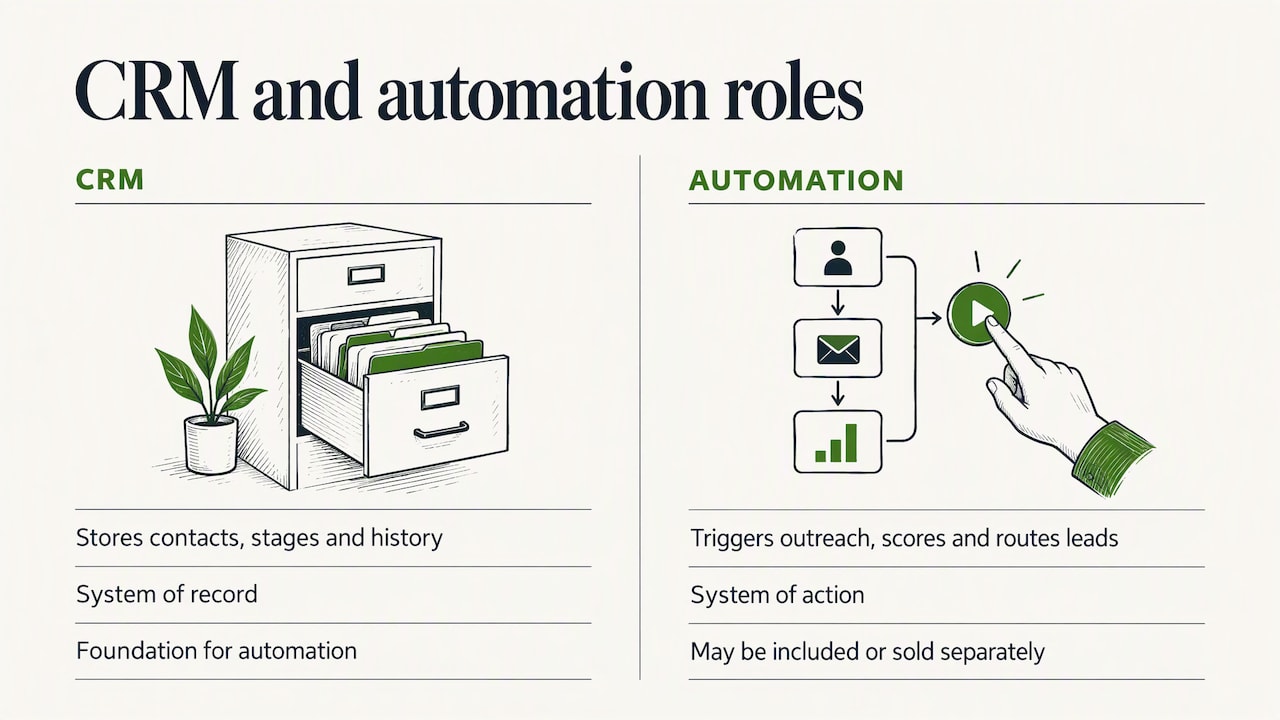
People use these terms interchangeably, and that causes expensive confusion. The cleanest way to separate them: a CRM is the system of record, and automation is the system of action. The CRM holds contacts, deal stages and history. Automation reads that data and does something with it.
Another vendor draws the same line: a CRM stores contacts, deal stages and activity history, while automation is the layer that triggers outreach, scores leads, routes qualified prospects and updates records based on rules or behavior. Microsoft adds a buying point worth remembering: sales automation may be included in a CRM or sold separately, so compare what each option actually includes before you pay for overlapping features.
The CRM is also the foundation. Automation relies on clean records, because it uses activity triggers such as calls, emails and deal-stage changes to update data and start work. If your records are messy, your automation will be too.
Map the process before you automate it
Every top-ranking guide on this topic starts with some version of “define your process.” It is the step most often skipped, and it decides whether the rest pays off.
A useful map answers one question: how does a stranger become a paying customer in your business, and where does that path leak? A practical small-business guide suggests you map how leads move from first contact to close, identify repeatable tasks, and monitor response time, follow-up completion and conversion rates. The typical stages are lead capture, qualification, follow-up, a meeting, and deal progression.
We would add a layer that most sales guides leave out: connect the sales path to the money. For each stage, write down three things.
Who touches it. A person, a shared inbox, a spreadsheet, or nobody.
How long it waits. The gap between a lead arriving and the first reply, or between a quote going out and the next contact.
What it costs when it fails. A lost lead, a late invoice, an hour of rework.
This is the logic behind the Money Map we use with clients: start from how the business makes money, then find lost revenue, excess cost and process friction. We go deeper on this mindset in our piece on mapping revenue workflows before buying tools.
A quick way to find the leaks
You do not need a consultant to start. Take your last ten won deals and your last ten lost ones, and trace each from first contact. Look for patterns:
Leads that waited more than a day for a first answer.
Quotes that were sent and never followed up.
Deals that were won but invoiced days later.
Information typed into more than one system.
Tasks only one person knows how to do.
Each of these is an automation candidate. Some are not automation problems at all: a lead that waited because nobody owns the inbox needs an owner first, then a rule.
Which sales tasks to automate
Not every step deserves automation. The best candidates are repetitive, rule-based and high-volume, and they do not need judgment or relationship nuance. Based on what the major vendors describe, businesses commonly automate contact data updates, lead evaluation and routing, follow-up emails, next-step workflows on opportunities, call transcription and analysis, territory planning, forecasting and quote creation.
Here is how that translates into a working list for a small or midsize business.
Stage | Good to automate | Keep human |
|---|---|---|
Lead capture | Form entries into the CRM, instant acknowledgment, source tagging | Judging unusual or high-value inquiries |
Qualification | Scoring on simple criteria, routing to the right person | The discovery conversation |
Follow-up | Reminder tasks, timed emails after no reply, meeting scheduling links | Personal notes after a real conversation |
Proposal | Quote generated from deal products and customer data, sent from the CRM | Pricing strategy and negotiation |
Closing to cash | Accepted quote turned into an invoice, payment reminders | Handling disputes and special terms |
Reporting | Pipeline dashboards, weekly summaries | Deciding what the numbers mean |
Quotes are a good example. A CRM can create a quote from the products on a deal and the customer’s data, then email it directly, as the same vendor guide describes. For service businesses, that step alone can remove an hour of manual work per proposal.
Do not forget sales order automation
Searchers often ask about the sales order process, and it matters because it is where selling meets getting paid. In short, sales order automation moves an accepted quote straight into an invoice, closing the loop between winning the work and collecting the money. Many businesses automate lead generation and then leave this handoff to a person with a spreadsheet. The delay shows up as a longer cash cycle, which is often a bigger financial drag than a slightly lower close rate.
The order to automate in
The most useful sequencing advice we have seen is to automate in the order money flows: lead capture, follow-up, quoting, invoicing, then payment reminders. It works for two reasons. Early steps leak the most revenue, since a lead that is never answered never becomes a customer. And later steps are easier to build once the earlier ones produce clean data.
A realistic first phase looks like this:
Week one: capture. Every inquiry, from every channel, lands in one place with a source and an owner.
Week two: respond. An automatic acknowledgment goes out immediately, and a task is created for a human to follow up within a set window.
Weeks three and four: follow up. A short sequence handles no-reply situations, and stops the moment the lead answers.
Month two: quote and invoice. Templates and triggers carry a deal from proposal to invoice.
Month three: payment and reporting. Reminders for overdue invoices and a single pipeline view for the owner.
This pace is deliberate. Each phase needs a few weeks of real use before you can trust it, and changing five things at once makes it impossible to see what helped.
Step by step: how to automate your sales process
Write down the current process as it really runs. Not the version in the handbook. Include the workarounds.
Fix the obvious breaks by hand first. Assign owners, remove duplicate steps, agree on what “qualified” means.
Choose the three to five tasks with the highest volume and the clearest rules. Leave the rest for later.
Check what you already own. Many businesses pay for a CRM with automation features they never switched on, and for several tools doing overlapping jobs.
Build each workflow small. One trigger, one action, one exit condition.
Test with dummy contacts before real ones. Watch what actually gets sent and when.
Launch, then review weekly for the first month. Read the messages your customers received, not just the dashboard.
Retire what does not earn its place. Every workflow is something you must maintain.
Step four deserves emphasis. Tool sprawl is one of the standard risks of automation, and it adds cost without adding revenue. Our article on cost reduction strategies for small businesses takes an operations-first view of how to audit what you already pay for.
Guardrails: benefits, risks and exit rules
The benefits are real and fairly consistent across guides: less manual admin, faster first response, standardized follow-up and faster cash cycles through automated quote-to-invoice flows. Large vendors frame it similarly: the value comes from turning customer and pipeline data into triggered actions and recommendations, so sellers spend less time on administration.
The risks are just as predictable, and they are mostly self-inflicted:
Setup time. The first workflow takes longer than expected because the process behind it was never written down.
Impersonal messages. A sequence that reads like a sequence loses the reply it was meant to win.
Automating a broken process. A slow, confusing handoff becomes a fast, confusing one.
Tool sprawl. Separate tools for forms, email, scheduling and quoting that do not share data.
Maintenance. Rules go stale when prices, offers or team members change.
Why exit rules matter
The sharpest illustration of the last risk comes from a simulation of 200 made-up contacts: without exit rules, the workflows sent 1,390 emails and texts. That is a test, not a real campaign, but it shows how quickly overlapping automations pile up on a single person. Build in these protections from day one:
A reply, a booked meeting or a won deal stops every active sequence for that contact.
A cap on messages per contact per week, across all workflows combined.
A suppression list for unsubscribes and for existing customers.
A named person who reviews the sequences every month.
If you email or text prospects in the United States, check the rules that apply to your channel and your list with your attorney. Commercial email and text marketing are both regulated, and the right advice depends on how you collect consent and who you contact.
Our perspective
We meet a lot of owners who bought a sales tool first and asked what it was for second. The tool was fine. The process under it was a guess.
Our view is simple. Sales automation is not a software project, it is a revenue project. Before we talk about any platform, we look at how the business makes money and where it leaks: slow replies, quotes that die in an inbox, invoices that go out a week late, three subscriptions doing one job. That is what the Money Map is for. It shows where an hour of automation is worth a thousand dollars and where it is worth nothing.
Because we sell no software and take no vendor commissions, we have no reason to recommend a bigger stack than you need. Sometimes the right answer is to switch on a feature you already pay for. Sometimes it is to fix a handoff between two people and automate nothing. When automation is right, we want it to run quietly in the background so you can stay focused on running your business, not on becoming a technology company.
Mirko
How to measure whether it works
Automation without measurement is just activity. Pick a few numbers before you launch, record the baseline, and compare after a month and again after a quarter. The small-business guidance above names the right ones: response time, follow-up completion and conversion rates.
Metric | What it tells you | Warning sign |
|---|---|---|
Time to first response | Whether capture and routing work | Still measured in hours or days |
Follow-up completion | Whether no lead is dropped | Tasks created but not done |
Lead-to-meeting rate | Whether outreach lands | Falls after sequences launch |
Quote-to-close rate | Whether proposals convert | Quotes sent, no follow-up |
Days from win to invoice | Whether the cash handoff is tight | More than a day or two |
Days to payment | Whether reminders work | Overdue invoices piling up |
Two cautions. First, watch for metrics that improve while results do not: more emails sent is not more sales. Second, tie at least one measure to money, such as days to payment or revenue per lead source, so the owner can see a financial effect rather than a tool report.
When to bring in outside help
Most of this you can do yourself with a few free afternoons. Outside help earns its fee in specific situations: your sales path crosses several people and systems, you suspect you are paying for overlapping tools, you are being pitched by vendors and cannot judge them objectively, or you want ongoing review as the business changes.
If you search for a sales process consultant, ask how they are paid. A consultant who earns commissions from the software they recommend has a built-in conflict. Ask whether they start from your revenue or from a product demo, and whether they will tell you when the best answer is not to buy anything.
Work with us
Our Digital & AI Office is a flat monthly retainer at €995 per month. It gives you an independent adviser who starts with how your business makes money, maps the workflow with our Money Map, and recommends automation, tools and AI only where they pay off. We sell no software and take no vendor commissions. Larger, hands-on initiatives are scoped separately as fixed-fee projects.
If your sales process feels like it is held together by inboxes and goodwill, see how Your Digital & AI Office works.

FAQ
What is the first thing to automate in a sales process?
Start with lead capture and first response, because an unanswered lead is the most expensive leak. Make sure every inquiry lands in one system with an owner, then send an immediate acknowledgment and create a follow-up task. Quoting, invoicing and payment reminders come next, in the order money flows.
Is sales automation the same as a CRM?
No. A CRM stores your customer data and deal history, while sales automation uses rules and triggers to act on that data, such as routing leads or sending reminders. Automation is often built into a CRM but can also be bought separately, so compare features before you pay for both.
Can a small business automate sales without expensive software?
Often, yes. Many businesses already own a CRM with automation features that are switched off, or pay for several tools with overlapping functions. Map your process, list what you already have, and automate the three to five highest-volume tasks before you buy anything new.
How do I avoid annoying customers with automated messages?
Use exit rules and frequency caps. Stop every sequence when a contact replies, books a meeting or buys, and limit total messages per contact across all workflows. Read the messages your customers actually receive, and keep personal moments, like follow-ups after a real conversation, in human hands.
How long does it take to automate a sales process?
A first useful version, covering capture, response and basic follow-up, can run within a few weeks if the process is already clear. Quoting, invoicing and reporting usually take another one to two months. Most of the time goes into mapping and testing, not building.